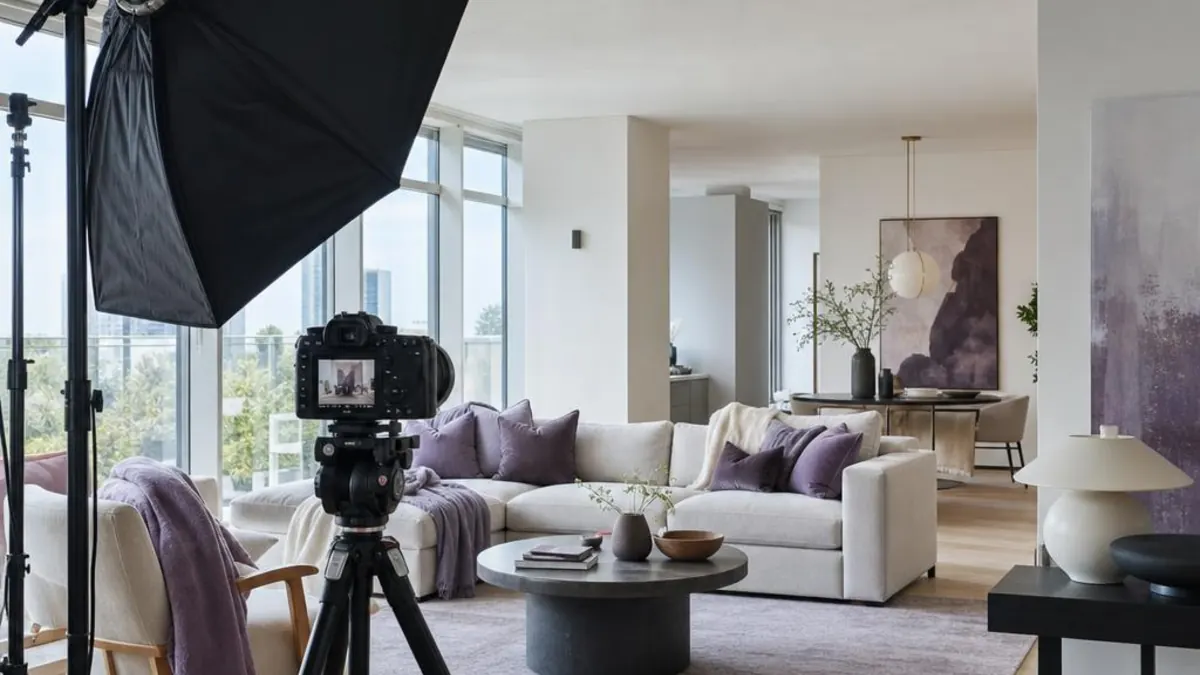
Before reading a single word of your listing, guests look at the photos. Booking.com says 63% of travellers rely on images when choosing a property, and on Airbnb the first photo is the large one that appears in search results. The description comes straight after and matters just as much: it sets guests’ expectations, and what they find on arrival decides the review. In 2026, the platforms are tying these things together ever more closely. Airbnb automatically sorts photos into rooms, summarises the reviews of every listing and suggests updating photos that no longer match reality. This guide shows you how many photos you need, how to take them without expensive equipment, what order to put them in and how to write a title and description that persuade without promising more than you offer.
Why photos decide the first click
On Airbnb, the first photo is the large one in search results, and the first 5 are prominently displayed on the listing page and, according to the platform, matter most. Booking.com says, based on its own data, that 63% of travellers rely on images when choosing a property, and recommends that partners upload at least 10 recent, tagged images, including the bathroom, kitchen, view, interior and exterior.
In a guide for partners, Booking.com also describes the results of its own experiments: around 24 property photos and 4 for each room type, including one of the bathroom, had a positive impact on conversion. The guide is written mainly for hotels, but its main conclusion applies to an apartment too: room photos matter most, and listings without them are usually ignored.
What to photograph: the checklist for an apartment
Booking.com’s photography guide for homes and apartments, published in 2019 and still available on its partner site, asks for each room to be photographed from several angles: from one corner, so that the whole room is visible, from the opposite corner and in detail, for the features that make it special. Airbnb recommends the same mix of wide, mid-range and close-up shots, for example the phone charger on the nightstand or the coffee and tea setup in the kitchen. For a typical apartment, the checklist looks like this:
| Space | What to show | What to check before the photo |
|---|---|---|
| Living room | A wide shot from a corner, the dining area and the detail that makes it special | TV switched off, cables hidden, surfaces clear |
| Bedroom | The bed, with the white linen that Order No. 948/2026 requires anyway, the wardrobe and the bedside tables | Curtains open, lamps on, bed freshly made, no clothes or laundry in sight |
| Kitchen | The appliances you mention in the listing and the tableware | Worktops clear, no cleaning products in sight |
| Bathroom | The shower or bath, the sink and the towels | Lights on, mirror clean, shower curtain open, toilet lid closed, no toilet paper or bin in the frame |
| Workspace | The desk, the chair and the socket | Only if the desk really exists and is comfortable |
| Balcony and view | The view, only if guests will really see it from the home | Honest framing, without zooming in to hide the buildings or construction sites opposite |
| Exterior and entrance | The building entrance and the facade, in the context of the street | No road signs, parked cars or passers-by in the frame |
| Accessibility features | Wide doorways, step-free access, grab rails | Shots that clearly show the width of the doors and the absence of thresholds |
Exterior photos are not a detail. Booking.com notes that a good exterior photo helps guests easily recognise the property when they arrive, and a clear image of the entrance also makes your check-in instructions easier to follow. If you want to attract a particular type of guest, Airbnb recommends photographing the features for them too, from those for families with children to those for remote workers. How to choose the right segment is covered in our guide to differentiation.
How to take good photos with your phone
You do not need expensive equipment to get good photos. Airbnb’s photography guide shows you how to use your phone as a camera, and Booking.com writes in its partner guide that a professional photographer can help, “but it’s definitely not necessary”, and that you can produce photos that sell even with the most basic camera. Preparation and a few simple rules matter more:
- Prepare the space. Clean, put away personal belongings, make the beds and hide the cables. A photographer and Superhost quoted by Airbnb remarks on how many people forget to clear their spaces of random objects before taking photos.
- Use natural light. Switch off the flash, open the blinds and curtains, and only turn on the lights if the image is still too dark. Photograph the interior when the rooms get the most daylight, and the exterior during the “golden hours”, the first 60 minutes after sunrise or the last 60 minutes before sunset.
- Shoot in landscape. Airbnb’s listing page displays photos in landscape, and Booking.com recommends landscape photos only, because they look best on the platform.
- Hold the phone straight. Booking.com’s guide recommends taking photos from a height of 100–160 cm and from the corners of the room, for perspective and depth. Airbnb recommends not tilting the phone up or down, so that guests see the space realistically; the camera grid helps you line things up.
- Edit sparingly. Adjust brightness and contrast, straighten and crop the image, but do not change how the space looks. Booking.com asks you to avoid fisheye lenses, photos that are too dark or too bright, black-and-white photos, collages and watermarks.
- Upload in high resolution. Airbnb asks for at least 1024 × 683 pixels and recommends at least 1200 × 800 in its photography guide, while Booking.com asks for at least 2048 × 1080 and prefers 4000 × 3000. A recent phone usually shoots at a higher resolution; just make sure messaging apps do not compress the images before you upload them.
What must not appear in your photos. Booking.com’s guide asks that photos do not show guests, logos, awards or contact details, your own reflection or the camera’s in mirrors and windows, or a TV that is switched on. Watch out for security cameras too: since 30 April 2024, Airbnb no longer allows security cameras inside the home, regardless of their location, purpose or prior disclosure. Outdoor cameras must be disclosed before booking, together with their general location, and breaking the rules can lead to the removal of the listing or the account.
Photo order and Airbnb’s photo tour
On Airbnb, photos are no longer just a gallery. The photo tour groups them by room: the platform’s AI engine automatically sorts images into 19 types of rooms and spaces, and anything it does not recognise goes into the additional photos. To appear in the tour, every room needs at least one photo. You can move, add or remove images and add details to each room about sleeping arrangements, amenities and accessibility.
- The first photo. Choose the best image of the main space or of the detail that sets you apart. It is the large photo in search results.
- The next four. You can reorder the first 5 photos on the cover page. Put the other key spaces here, for example the bedroom, kitchen, bathroom or view, so that guests understand the home without opening the whole gallery.
- Captions. Explain what the image does not show. Airbnb gives examples such as “Bedroom 1 is on the second floor and has an en-suite bathroom”.
- Visual descriptions. You can add a visual description (alt text) of fewer than 250 characters to each photo, which screen readers read aloud to blind or low-vision guests and which appears when the image does not load. Describe objectively what is shown; leave the mood for the caption.
On Booking.com, tag each image with the space it shows. The partner guide notes that the exterior photo is usually the first picture guests see in search results, so it should be honest and realistic, and that the platform displays a maximum of 10 photos per room category.
Title and description: specific, brief and honest
The title is the first text guests see. Airbnb gives the example “Quiet studio near Uffizi”: a few words that say what kind of home it is, where it is and what makes it special. You can change it at any time, but the platform’s content policy prohibits misleading information, symbols and emojis in titles.
For the description, Airbnb has a few recommendations worth following on any platform:
- Lead with what matters most. Guests often scan descriptions for key features. Do not repeat the list of amenities, which they see in another section anyway.
- Tell guests what it is like to stay there. A modest room downtown can be “a perfect base for exploring the city”, and a top-floor apartment surrounded by trees can “feel like you’re in a treehouse”.
- Be honest about the drawbacks. Airbnb gives the example of a home above a coffeehouse that is busy from 6 am to 10 pm. Say if there are stairs without a lift, street noise or hard-to-find parking, especially when these could be a problem for people with limited mobility or families with children.
- Fill in every section. Besides the description, Airbnb has sections on your property, guest access, interaction with guests and other details, for example the real distance to the city centre.
- Tick every amenity. Many guests filter search results by amenities, and Airbnb offers nearly 150 to choose from. On Booking.com, the facilities you tick even generate the property description, automatically translated into all the platform’s languages.
Accuracy is not only about reviews. If a promised amenity is missing or does not work, Airbnb’s Rebooking and Refund Policy lets the guest report the problem within 72 hours of discovering it and receive a refund, and your payout is reduced by the amount refunded. Law No. 363/2007 punishes misleading commercial practices with fines of 20,000–100,000 lei, so do not put a higher classification category in your listing than the one on your certificate; the classification steps are explained in our guide to Order 948/2026. And if you need guests’ identity details for legal obligations, Airbnb only allows you to ask for them after booking if your listing description stated, at the time of booking, what is required and why; the details are in our guide to digital check-in and the occupancy form.
When to update your listing
A good listing does not stay good forever. With its summer release in May 2026, Airbnb introduced review-based suggestions: if guests say the kitchen does not look like the photos, it recommends updating them, and if they had trouble getting in, it suggests rewriting your check-in instructions. The same release brought automatic review summaries, which highlight what guests say about the location, the amenities or how suitable the home is for families; they are explained in our guide to Airbnb’s 2026 Summer Release. An old photo that no longer matches reality therefore quickly finds its way into reviews; how to manage them is covered in our guide to reviews.
When you change your listing, keep one detail in mind: guests who already have a booking, whether confirmed or pending, do not see the changes. If you have removed an amenity they were expecting, message them straight away. If they no longer wish to keep the reservation, you are the one who has to cancel it, so that they can rebook elsewhere.
Text and photos also matter for AI-powered search. On 30 September 2026, Airbnb announced AI search and filters, as well as AI-generated listing descriptions in search results, starting in the US for now. An AI assistant has no way of knowing about your desk or your parking if they do not appear in your amenities, photos or description; what you can do for such assistants is covered in our guide to agentic search. And if you also want direct bookings, the same photos and text will serve you on your own website.
Common mistakes
- Portrait or low-resolution photos. Both platforms recommend landscape photos, and a small photo looks blurry on large screens.
- Rooms without photos. On Airbnb, a room with no photos does not appear in the photo tour, and Booking.com notes that listings without room photos are usually ignored.
- Misleading angles. Fisheye lenses and tilted or over-edited photos make rooms look different from what they are, and the difference shows on arrival and then in reviews.
- Views guests will not have. Only show the view if it can really be seen from the home, not from the roof of the building.
- A description that repeats the amenities list. Use the description for what the photos do not show: the atmosphere, the area and the practical details.
- Hidden drawbacks. Unmentioned stairs, noise or lack of parking end up in reviews, under accuracy.
- A listing not updated after a change. An amenity that no longer exists but is still in the listing can lead to refunds.
Frequently asked questions
Do I need a professional photographer?
Not necessarily. Airbnb’s guide shows you how to take photos with your phone, and Booking.com writes that a professional photographer can help but is not necessary. A professional is worth considering when your home has spaces that are hard to photograph, such as small or dark rooms, or when you manage several units and want photos with a consistent look.
How many photos should my listing have?
Booking.com recommends at least 10 recent images, and its guide for homes and apartments at least 4 photos of each room and at least one of the bathroom. On Airbnb, every room needs at least one photo to appear in the photo tour, and the first 5 matter most. An apartment with a living room and one bedroom can easily reach 20–25 photos, but more important than the number is that every space is shown clearly and as it is today.
What should I say in my listing about security cameras?
Security cameras inside the home have not been allowed on Airbnb since 30 April 2024. Outdoor cameras, such as a doorbell camera, must be disclosed before booking, together with their general location; they may not monitor indoor spaces and are not allowed in places such as an enclosed outdoor shower or a sauna. Noise monitors must also be disclosed, are only allowed in common spaces and only measure sound levels, without recording or transmitting conversations.
Should I also write my description in English?
On Booking.com, the description generated from the facilities you tick is automatically translated into all the platform’s languages. For the text you write yourself, an English version helps foreign guests, who in January–July 2026 came mainly from Germany, Italy and the US; you can find out more about them in our analysis of source markets. Order No. 948/2026 requires the information materials in the home to be in Romanian and at least one widely spoken international language anyway.
Sources
- Booking.com for Partners – Property page
- Airbnb Help Center – Setting up a photo tour for your home listing
- Airbnb Newsroom – Airbnb 2026 Summer Release (20 May 2026)
- Airbnb – All-new insights to help your listing stand out (20 May 2026)
- Booking.com for Partners – Inspire with your photos (PDF)
- Booking.com for Partners – Photography Guide for homes & apartments (PDF)
- Airbnb – Refresh your listing
- MEDAT Order No. 948/2026 – Romanian Legislative Portal (in Romanian)
- Airbnb Help Center – Taking great photos of your listing
- Airbnb – How to take great photos for your listing (20 June 2024, updated 8 November 2024)
- Airbnb Newsroom – An update on our policy on security cameras
- Airbnb Help Center – Add visual descriptions to photos in your listing
- Airbnb Help Center – Edit your listing’s title
- Airbnb – Writing an effective listing description (18 November 2020, updated 28 November 2023)
- Airbnb Help Center – Add amenities to a listing
- Airbnb Help Center – Rebooking and refund policy for homes (effective 6 February 2025)
- Law No. 363/2007 on combating unfair practices of traders towards consumers (consolidated version) – Romanian Legislative Portal (in Romanian)
- Airbnb – Verifying your identity on Airbnb
- Airbnb Help Center – Updating listing descriptions after a guest has booked
- Airbnb Newsroom – Airbnb 2026 fall update (30 September 2026)
- Agerpres – Tourist arrivals and overnight stays in Romania up by more than 6% in July 2026 (4 September 2026)